September 21, 2026
DotJS 2026: AI in the Browser, Web Security & Performance Take Center Stage

7 minutes reading

DotJS 2026
Back at Folies Bergère for the 2026 edition of dotJS, the Premier Octet team spent the day soaking up (and frantically keeping up with) both regular and lightning talks at this ever-compelling JavaScript conference. Here’s our summary of the day’s first six talks: a great blend of under-the-radar browser APIs, AI finally running locally, and a look behind the scenes at the npm supply chain.
On the Schedule
The (Abundant) State of the Web
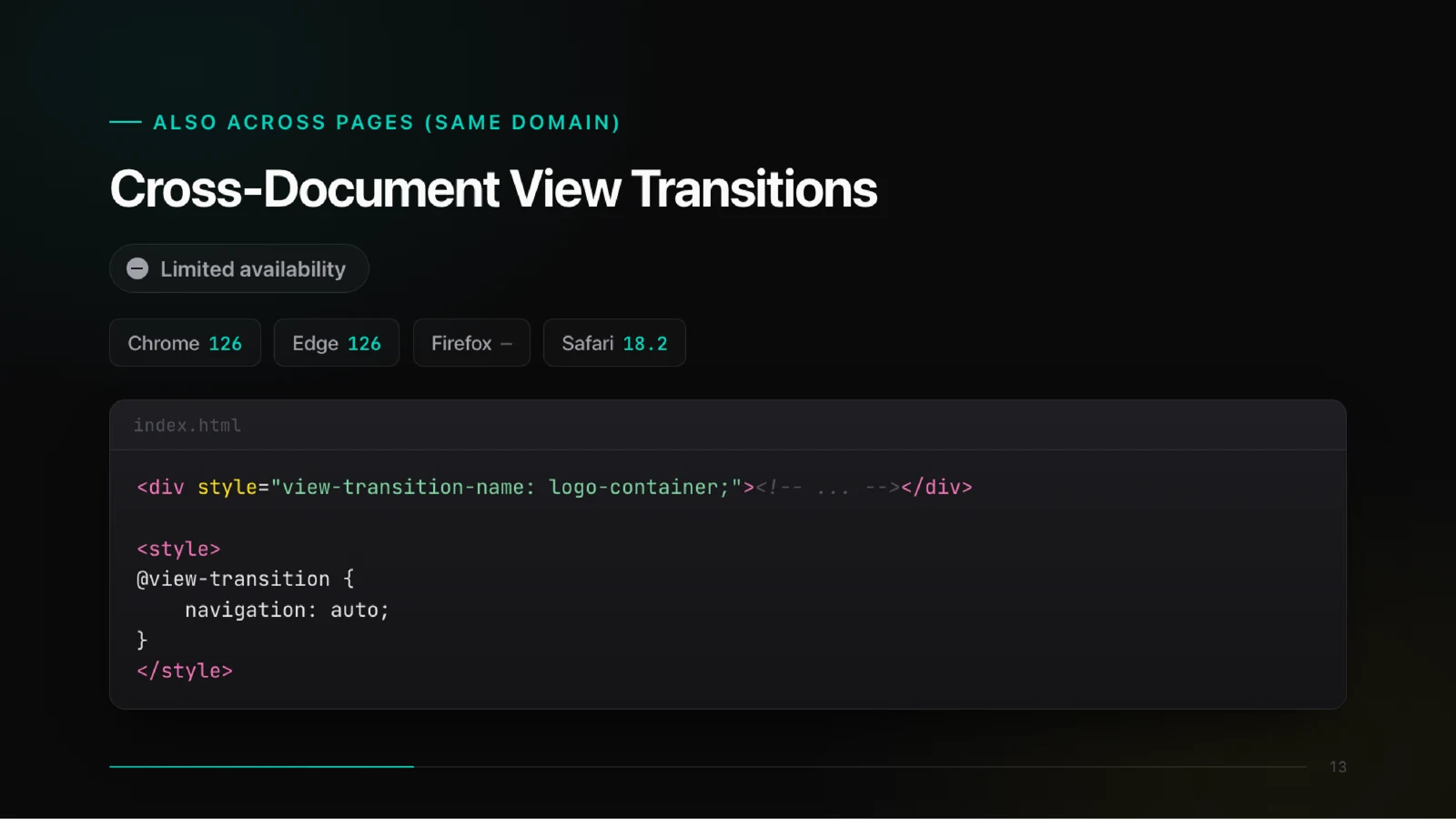
Kicking things off, Jad Joubran offered a whirlwind tour of everything the web platform can already do, often without us realizing it: fully customizable <select> elements in CSS, scroll-driven animations, View Transitions API (even between two separate pages), and the Document Picture-in-Picture API to float any HTML content.
He wrapped up with speculation rules and prerendering to preload the next page before you even click, and a nod to transformers.js to remind us that AI firmly belongs on this “abundant” web.
💡 Key Takeaways
- 🎛️ Fully customizable
<select>elements and scroll-driven animations are now natively available in CSS - 🔄 View Transitions API animates state changes, even across separate documents
- 🪟 Document Picture-in-Picture API can float any HTML content above the window
- ⚡ Speculation rules and prerendering allow preloading of the next page before user interaction
- 🤖 Even light AI models (transformers.js) now have a real use-case directly in the browser
Boring but Effective: WebAI That Ships
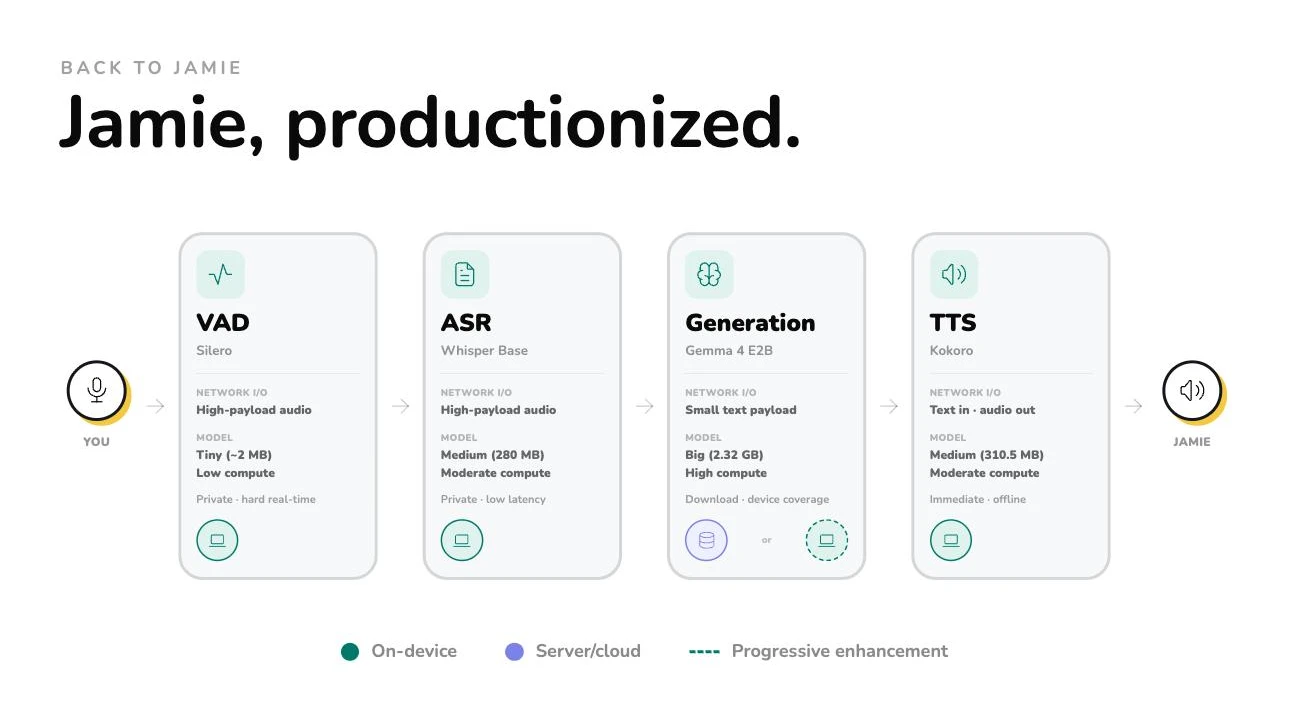
Nico Martin (Hugging Face, WebML) opened with “Jamie,” a 100% local voice assistant for the kitchen: no server calls at all, even in airplane mode. Technically, it’s a pipeline of small specialized models (VAD, Whisper-tiny via transformers.js, a lightweight LLM, TTS) accelerated by WebGPU, running close to real-time on his MacBook M3. He demoed live subtitles, depth estimation, background removal, semantic search, and local anonymization of personal data before sending anything to a cloud-based LLM.
Still, he cautioned: these models collectively weigh over 2 GB to download. His message: don’t try to run everything locally. Keep the small models client-side, and leave the larger models, like LLMs, on the server.
💡 Key Takeaways
- 🎙️ “Jamie,” a full-featured voice assistant, runs entirely offline in-browser via transformers.js
- 🧩 Instead of a monolithic model, it’s a pipeline of small, specialized models (VAD, Whisper, LLM, TTS)
- ⚡ WebGPU powers real-time transcription, even on modest hardware
- 🕵️ Demoed a local model that anonymizes personal data before sending it to a cloud LLM
- ⚖️ The hybrid approach: over 2 GB of models to download, local for the small stuff, server-side for the big LLMs
What You're Really Trusting When You Run npm install
🎤 Karen Li
Karen Li (npm team, GitHub) dived into what really happens behind the scenes when you run npm install: your dependency tree might be frozen by a lockfile, or more dangerously resolved on-the-fly if the lockfile’s missing (and there’s a real-world example of a compromised package for good measure).
She presented npm’s latest defenses: “minimum release age” to quarantine any freshly published version, blocking install/postinstall scripts by default from npm 12, no more installs from arbitrary Git URLs, and on the publishing side, the move to “trusted publishing” (short-lived tokens for CI) and “staged publishing” (maintainer validation before go-live). Her closing thoughts: running npm install means trusting code you'll probably never review, but these new features sharply reduce that blind trust.
💡 Key Takeaways
- 🔒 Without a lockfile,
npm installmay silently pick up a freshly published malicious release - ⏳ “Minimum release age” puts every new version in quarantine before it’s available in CI
- 🚫
install/postinstallscripts are now blocked by default as of npm 12 - 🔑 “Trusted publishing” replaces static npm tokens with short-lived, CI-scoped tokens
- ✅ “Staged publishing” requires human verification before any new version goes public
Web Performance APIs That You (Probably) Never Knew Existed
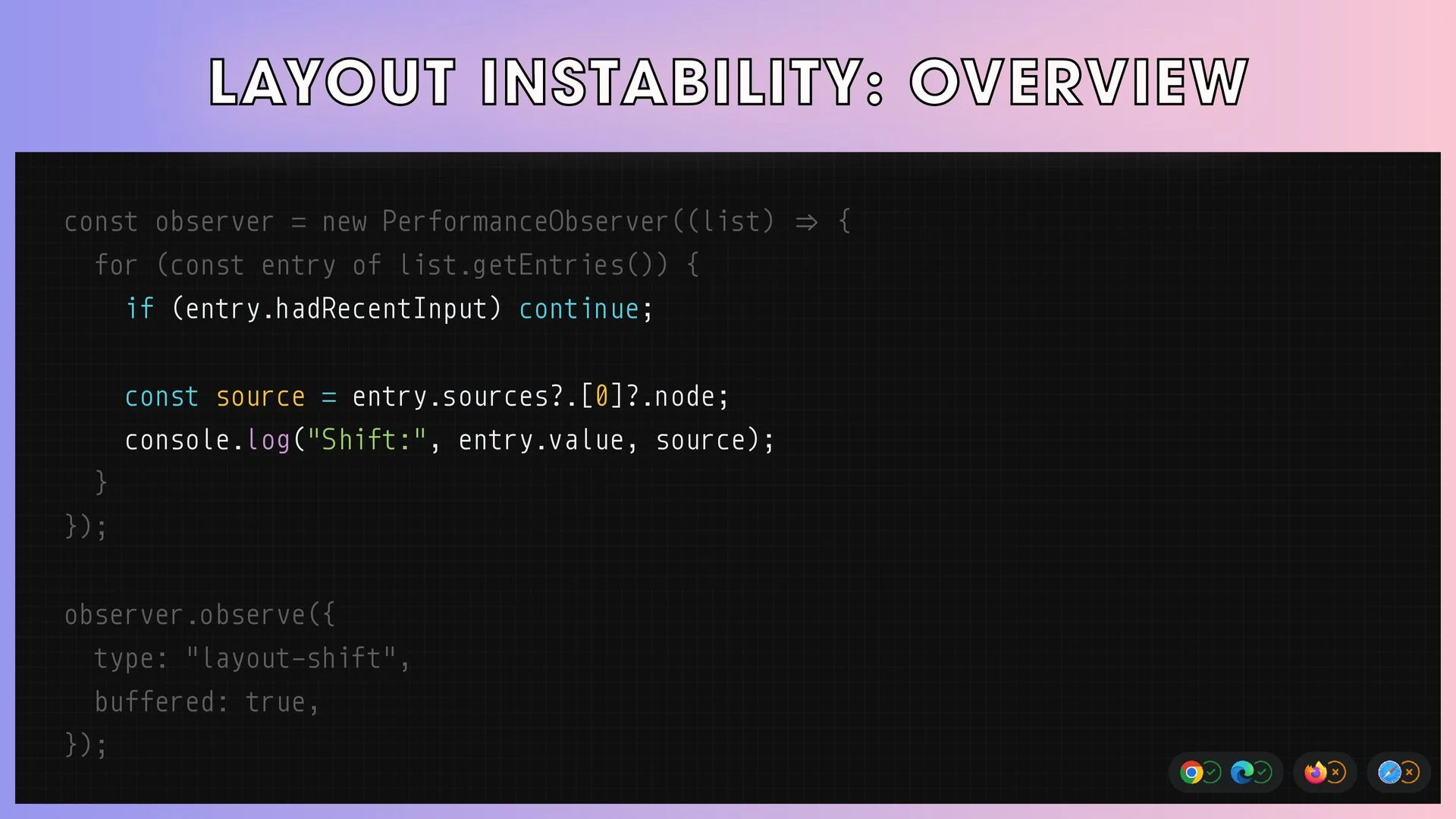
Matheus Albuquerque (Medallia, Google Developer Expert, Web Performance) started with an observation: everyone knows Core Web Vitals, but rarely the APIs that let you truly understand what’s happening in production. He listed a host of overlooked APIs: Layout Instability API (pinpoints what causes a layout shift), Long Animation Frames API (flags frames over 50 ms and the responsible script), Self Profiling API (user-side profiler without devtools), and Memory Measurement API (catching memory leaks).
He then covered Compute Pressure API (adapt your app when CPUs are stressed), Speculation Rules and Priority Hints (preloading and prioritizing resources), and Prioritized Task Scheduling API for splitting up long tasks, much nicer than old generator or Redux saga tricks. To wrap up: View Transitions API for smooth navigation.
💡 Key Takeaways
- 📐 Layout Instability API precisely identifies which element causes a layout shift
- 🐌 Long Animation Frames API isolates the script responsible for sluggish frames
- 🧠 Memory Measurement API helps track down memory leaks from forgotten closures and listeners
- 🔋 Compute Pressure API lets the app adapt when the CPU’s under load
- ⏱️ Prioritized Task Scheduling API elegantly replaces kludgy hacks for breaking up long tasks
Unlocking Client-Side AI in Your Web App
Maximiliano Firtman likened client-side AI to a train picking up speed “in days, not years.” He drew a line between low-level tools (transformers.js, ONNX Runtime Web, WebLLM, MediaPipe, relying on a custom model, hardware-boosted via WebGPU/WebNN) and the higher-level browser APIs (Translator, Summarizer, Writer/Rewriter, Prompt API), which draw on embedded models like Chrome’s Gemini Nano, the only browser so far betting on this wave.
His 100% offline demos (chatbot, speech translation, 3D pose estimation, screen description via an Apple model) all pointed back to his key advice: choose a hybrid approach, deciding case by case if the logic should stay local or go cloud, not just rely on a single giant model.
💡 Key Takeaways
- 🚂 According to Firtman, client-side AI is progressing “in days, not years”
- 🧰 Two approaches: low-level libraries (transformers.js, WebLLM, etc.) vs. high-level browser-integrated APIs
- 🌐 Chrome packs Gemini Nano to power its native AI APIs; Firefox and Safari are still catching up
- ✈️ All demos ran fully offline, including speech translation and pose detection
- ⚖️ The smart approach is hybrid: pick local or cloud for each feature, don’t go all-in on a single model
JavaScript tooling has a blind spot: codebase-wide questions
Bart Waardenburg described his frustration: sending linter errors to an LLM improves code quality, but a linter only ever sees one file at a time. Dead code, duplication, unnoticed complexity, architecture drift: all these problems stay hidden, for both people and AI agents.
So he built Fallow, a static analysis tool in Rust that turns your whole TypeScript/JavaScript codebase into a dependency graph to spot unused code, duplication, high-cyclomatic-complexity functions with risky commit histories (the real danger zones), and architectural boundaries being crossed. There’s even runtime instrumentation for catching dead code in production. His message: both humans and AI agents need this holistic codebase view to make informed decisions.
💡 Key Takeaways
- 🕸️ Linters only see one file at a time, so dead code, duplication, and drift go unnoticed
- 🛠️ Fallow (Rust) builds a complete dependency graph of your codebase for true project-level insights
- 🚗 Cross-checking cyclomatic complexity and Git history reveals high-risk code areas
- 🧪 Combining complexity and test coverage helps prioritize what to review
- 🤖 Project-scale signals are just as valuable to AI agents as they are to human developers
What about the rest of the day?
The afternoon kicked off with lightning talks: Nikolay Rodionov on Skybridge, his framework for building MCP apps; Gabor Csomak on microfrontends as an organizational strategy, not just a technical solution; Guillaume Moigneu on TypeScript as a safety net for AI-generated code; and Thorsten Seyschab with a JavaScript quiz in the style of a game show.
The deep-dives resumed: Vishnudhasan Govindarajan pointed out that Lighthouse scores don’t reflect real 3G experience; Harshil Agrawal demonstrated safely generating and running React components from an LLM using V8 isolates; Devlin Duldulao retraced the troubled history of JavaScript’s Date and the arrival of Temporal; and Lea Verou closed the event questioning the future of development without bundlers.
In Short
A clear trend emerged: browser-based AI has moved beyond demo status to become a serious engineering concern (Nico Martin, Maximiliano Firtman). Meanwhile, two enduring foundations, npm security (Karen Li) and web performance (Matheus Albuquerque), framed the event, while Bart Waardenburg raised a question that’s sure to become central: as AI agents write more and more code, who keeps the big-picture view of the codebase?