22 juin 2026
Create a Minimalist RAG with Gemini and Google Drive

4 minutes reading
Most "build your RAG" tutorials overwhelm you with vector databases, chunking strategies, and reranker comparisons. All of this can be greatly simplified with Google Workspace, which already provides the three building blocks of a RAG, and the glue is assembled in just a few hours.
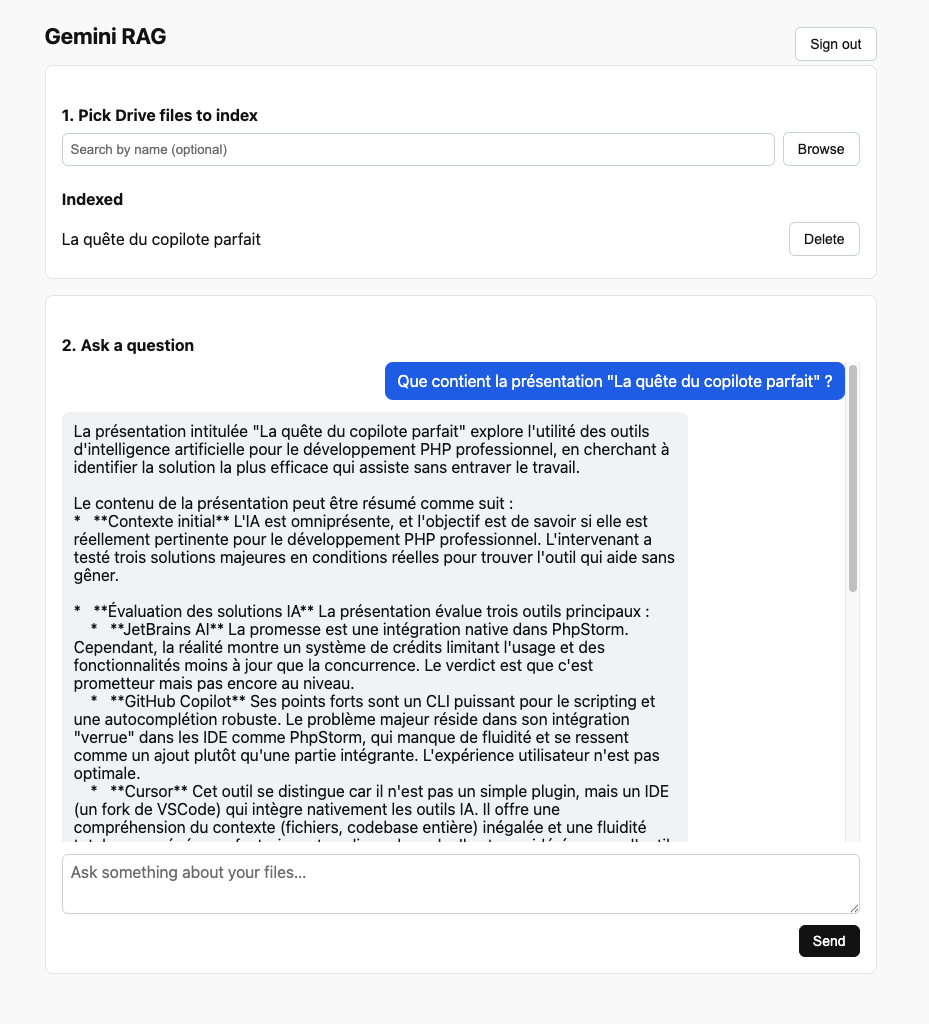
This post outlines a small experiment: a web app that connects you with Google, lets you select files in your Drive, indexes them with Gemini, and then interacts with them.
What is a RAG, really?
Retrieval-Augmented Generation, in this context, involves two steps:
- Retrieve — given a question, find the parts of your documents most likely to contain the answer.
- Generate — embed these parts into the prompt and let the LLM formulate the response.
Usually, this requires: breaking documents into chunks, transforming them into vectors, storing these vectors in a database, and ranking the results to the query. Each of these steps comes with numerous articles debating the "right" way to do it.
The shortcut here is to let Gemini handle everything. The Gemini API exposes a FileSearchStore — you upload your files, and Google takes care of chunking, embeddings, and retrieval. At the time of the query, you provide the store as a tool, and the model decides when to search and how to handle the results.
Three dependencies, one provider
The entire stack is within Google Workspace:
- Gemini API — the LLM and the File Search Store. An API key.
- Google OAuth — for the user to authorize the app to read their Drive. An OAuth client.
- Google Drive API — to list and download files. The same OAuth client.
No Pinecone, no LangChain, no embedding model to choose. The only necessary "infrastructure" is a memory to track which Drive files have been indexed and the name of the store.
For the framework, I chose TanStack Start — a full-stack React framework where server logic is only a typed function that the client directly calls. No REST routes to write, no client/server boundary to design. A server function looks like this:
const chat = createServerFn({ method: 'POST' })
  .validator((d: { question: string }) => d)
  .handler(async ({ data }) => ask(data.question))
And on the client side:
await chat({ data: { question: '...' } })
That’s the entire RPC layer.
Step 1: Searching in Drive
Once the user is connected via OAuth (with the drive.readonly scope), listing files is just one call away:
const res = await drive.files.list({
  q: "trashed = false",
  pageSize: 50,
  fields: 'files(id, name, mimeType, modifiedTime)',
  orderBy: 'modifiedTime desc',
})
The only subtlety is the MIME types. PDF and text files can be downloaded as they are (alt: 'media'), but Google Docs, Sheets, and Slides are virtual — they must be exported first:
const GOOGLE_DOC_EXPORTS = {
  'application/vnd.google-apps.document':     { mimeType: 'application/pdf' },
  'application/vnd.google-apps.presentation': { mimeType: 'application/pdf' },
  'application/vnd.google-apps.spreadsheet':  { mimeType: 'text/csv' },
}
A Google Doc is exported as a PDF, a Sheet as a CSV. Gemini File Search natively handles both.
Step 2: Indexing a file
Here's the magic part. Indexing is simply uploading + waiting:
const ai = new GoogleGenAI({ apiKey })

// Create the store once, at the first use
const store = await ai.fileSearchStores.create({
  config: { displayName: 'gemini-rag' },
})

// Upload a Drive file
let op = await ai.fileSearchStores.uploadToFileSearchStore({
  file: new Blob([bytes], { type: mimeType }),
  fileSearchStoreName: store.name,
  config: { displayName: name, mimeType },
})

// Indexing is asynchronous
while (!op.done) {
  await new Promise(r => setTimeout(r, 2000))
  op = await ai.operations.get({ operation: op })
}
That's the entire indexing pipeline. Google chunks the file, computes the embeddings, and writes them in the store. Behind the scenes, it's the same mechanism as a vector database — except you don't have to operate it.
The only state we keep ourselves is a small JSON file that maps { driveId → { name, mimeType } }. This serves two purposes: avoid reindexing files already uploaded, and retain the store's name between server restarts.
Step 3: Conversing
const res = await ai.models.generateContent({
  model: 'gemini-2.5-flash',
  contents: question,
  config: {
    tools: [{ fileSearch: { fileSearchStoreNames: [store.name] } }],
  },
})
return res.text
That's the entire chat handler. We provide Gemini with the question and a pointer to the store. Gemini decides whether to search, performs the retrieval, picks relevant chunks, and writes the response.
If you've ever built a RAG manually, this feels like cheating.
What it is not
Let's be honest, we are quite far from a production-ready project, but the main logic of the RAG is present and functional.
A complete solution would require:
- database storage
- automatic and recursive synchronization of Drive folders
- a fully-fledged, multimodal, and streamed chat interface (https://ai-sdk.dev/)
Key takeaways
If you're building a RAG for an internal tool and you're already within the Google ecosystem, you almost certainly don't need to set up a vector database. Note that the free tier of the FileSearch API allows for 1 GB of storage.
If you're looking to chat with your documents using AI, also within the Google ecosystem, I highly recommend NotebookLM which additionally allows you to generate related content (audio summaries, videos, quizzes, infographics...) related to your documents.
The entire RAG code is around 500 lines and is available on GitHub.