October 15, 2025
Better Auth: Structure and Permissions with the Organization Plugin

8 minutes reading
After exploring the fundamentals of Better Auth, let's take a closer look at one of its key plugins: Organization.
Managing a hierarchy of users and permissions in an application can quickly become a headache. The Organization plugin from Better Auth offers an elegant and modular approach — it lets you manage multi-user structures (teams, companies, projects...), assign roles, and implement permissions.
Here's what we'll cover:
- managing state between client and server,
- customizing the Organization model,
- setting up an advanced permissions system,
- and enabling Teams mode for more complex use cases.
Separation of Client and Server State
A key concept to understand is that auth (server) and authClient (client) act as two separate systems, they do not share synchronized state automatically.
👉 In practice:
- Actions executed via
auth.apido not automatically update client-side hooks (e.g.useSession,useActiveOrganization). - You must explicitly refresh client state after any action that affects the session, organization, or roles. For instance, the
useActiveOrganization()hook exposes arefetch()method to refresh the active organization's client-side data.
This behavior stems from the separation between client and server: Better Auth does not automatically synchronize these two states, giving developers full control over client-side refreshes. Similar to other modern authentication libraries, automatic synchronization is typically avoided for performance and security reasons.
Customizing the Organization Model
The tables required by the Organization plugin are customizable. You can rename them and their fields or add extra fields. The Better Auth CLI will then generate the appropriate schema in your database using the command npx @better-auth/cli generate (here we use Prisma with its adapter).
In this example, we'll rename Organization to Project and its field name to title (though we'll continue referring to it as organization throughout the article).
plugins: [
  organization({
    schema: {
      organization: {
        modelName: 'project', // `Organization` will be renamed `Project`
        fields: {
          name: 'title', // `name` will be renamed `title`
        },
      },
      member: {
        additionalFields: {
          name: {
            // Adds a `name` field to the `Member` table
            type: 'string',
            input: true,
            required: false,
          },
        },
      },
    },
  }),
]
// Generated tables

model Project {
  id          String       @id
  title       String
  slug        String?
  logo        String?
  createdAt   DateTime
  metadata    String?
  members     Member[]
  invitations Invitation[]

  @@unique([slug])
  @@map("project")
}

model Member {
  id             String   @id
  organizationId String
  project        Project  @relation(fields: [organizationId], references: [id], onDelete: Cascade)
  userId         String
  user           User     @relation(fields: [userId], references: [id], onDelete: Cascade)
  role           String
  createdAt      DateTime
  name           String?

  @@map("member")
}

model Invitation {
  id             String   @id
  organizationId String
  project        Project  @relation(fields: [organizationId], references: [id], onDelete: Cascade)
  email          String
  role           String?
  status         String
  expiresAt      DateTime
  inviterId      String
  user           User     @relation(fields: [inviterId], references: [id], onDelete: Cascade)

  @@map("invitation")
}
⚠️ Renaming affects only the database mapping, not the SDK method names (authClient.organization.*, auth.api.*).
// ✅ Correct
const { data, error } = await authClient.organization.delete({
  organizationId: activeOrganization!.id,
})

// ❌ Incorrect
const { data, error } = await authClient.project.delete({
  projectId: activeProject!.id,
})
Setting Up a Permission System
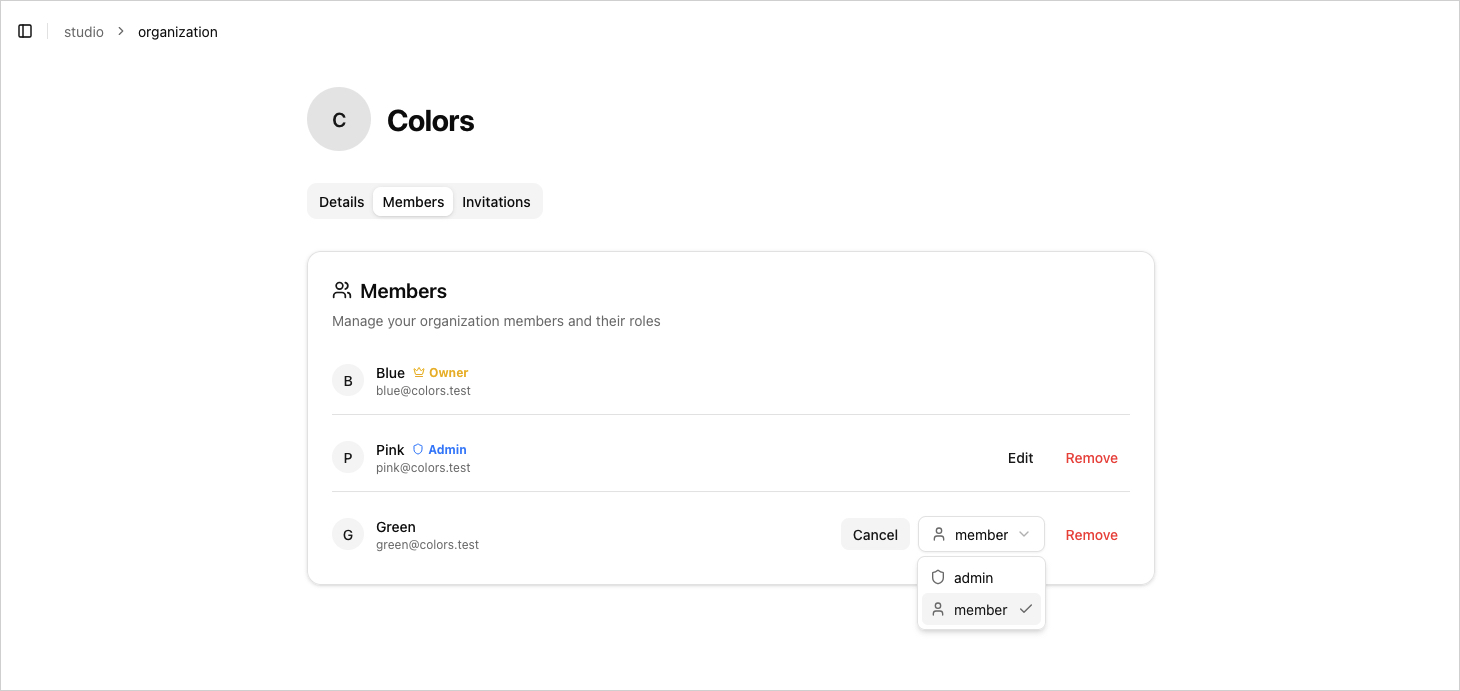
This is arguably one of the most interesting parts of the Organization plugin: Better Auth provides a flexible Access Control system using its createAccessControl. It relies on a declarative security approach, where each role is assigned a set of authorized actions on specific entities.
Terminology summary:
- Entity → represents an object being acted upon (
organization,member,invitation). - Action → represents what can be done on an entity (
update,delete, etc.). - Permission → is the combination of an entity and an action (for example, a
memberwith thecreateaction on theinvitationentity can create an invitation). - Role → is a set of permissions assigned to a user.
Example configuration file:
Here’s a minimal example to define actions per entity and compose roles.
import { createAccessControl } from 'better-auth/plugins/access'

const statement = {
  organization: ['update', 'delete'],
  member: ['create', 'update', 'delete', 'update-name'],
  invitation: ['create', 'cancel'],
} as const

const ac = createAccessControl(statement)

const member = ac.newRole({
  member: ['update-name'],
})

const admin = ac.newRole({
  member: ['update', 'delete', 'update-name'],
  invitation: ['create', 'cancel'],
})

const owner = ac.newRole({
  organization: ['update', 'delete'],
  member: ['update', 'delete', 'update-name'],
  invitation: ['create', 'cancel'],
})

export { statement, ac, owner, admin, member }
Key Points
- A user can have multiple roles.
- You can define your own permissions (e.g.
update-name). - If you define a custom
acandroles, Better Auth's default permissions are overridden. Since Better Auth expects certain actions for its internal checks, you should reintroduce the base actions if you want to use built-in plugin methods:organization: ["update", "delete"]member: ["create", "update", "delete"]invitation: ["create", "cancel"]
If one of these actions is missing, roles that lack it won’t be able to execute the corresponding methods (auth.organization.update, auth.organization.inviteMember, etc.) — they’ll be considered unauthorized.
Custom Permission
You might wonder why we have both update and update-name permissions. Intuitively, you'd expect update to cover all update actions, but in the Organization plugin, update refers specifically to the updateMemberRole method, which changes a member's role.
This is because the Member table doesn't have any fields you'd want to edit by default other than role. Our custom update-name permission will only make sense if we add a name field to the Member table and implement the corresponding business logic (through our own routes or server actions).
Checking Permissions on Client and Server
A good practice is to perform a double check:
- Client-side → for UI logic (show/hide elements).
- Server-side → for security and truth validation.
Client-side
authClient.organization.checkRolePermission({
  permissions: { organization: ['update'] },
  role: 'owner',
})
This method is synchronous and does not depend on the server. It's ideal for adjusting UI elements based on role permissions but does not reflect recent changes (e.g. role updates or revocations).
Server-side
The server remains the source of truth. Since roles and permissions are stored in the database, you should always validate server-side:
await auth.api.hasPermission({
  headers: await headers(),
  body: {
    permissions: { organization: ['update'] },
  },
})
Here's a small utility along with client/server implementations:
import { statement } from '@/lib/auth/permissions'

export type Entities = keyof typeof statement
export type PermissionFor<E extends Entities> = (typeof statement)[E][number]
// Client side
export const hasClientPermission = <E extends Entities, P extends PermissionFor<E>>(
  role: Role,
  entity: E,
  permission: P
) => {
  return authClient.organization.checkRolePermission({
    permissions: { [entity]: [permission] },
    role: role!,
  })
}
// Server Side
'use server'

import { auth } from '@/lib/auth'
import { ERROR_MESSAGES } from '@/utils/constants'
import { Entities, PermissionFor } from '@/utils/organization/permissions'
import { headers } from 'next/headers'

export const hasServerPermission = async <E extends Entities, P extends PermissionFor<E>>(
  entity: E,
  permission: P
) => {
  try {
    const { error, success } = await auth.api.hasPermission({
      headers: await headers(),
      body: {
        permissions: { [entity]: [permission] },
      },
    })

    if (error) {
      throw new Error(error)
    }

    if (success === false) {
      throw new Error(ERROR_MESSAGES.YOU_DONT_HAVE_PERMISSION_TO_DO_THIS_ACTION)
    }

    return success
  } catch (error) {
    if (error instanceof Error) {
      throw new Error(error.message)
    }

    console.error('[🔴 hasPermission]: ', error)
    throw new Error(ERROR_MESSAGES.AN_ERROR_OCCURRED)
  }
}
Managing invitations
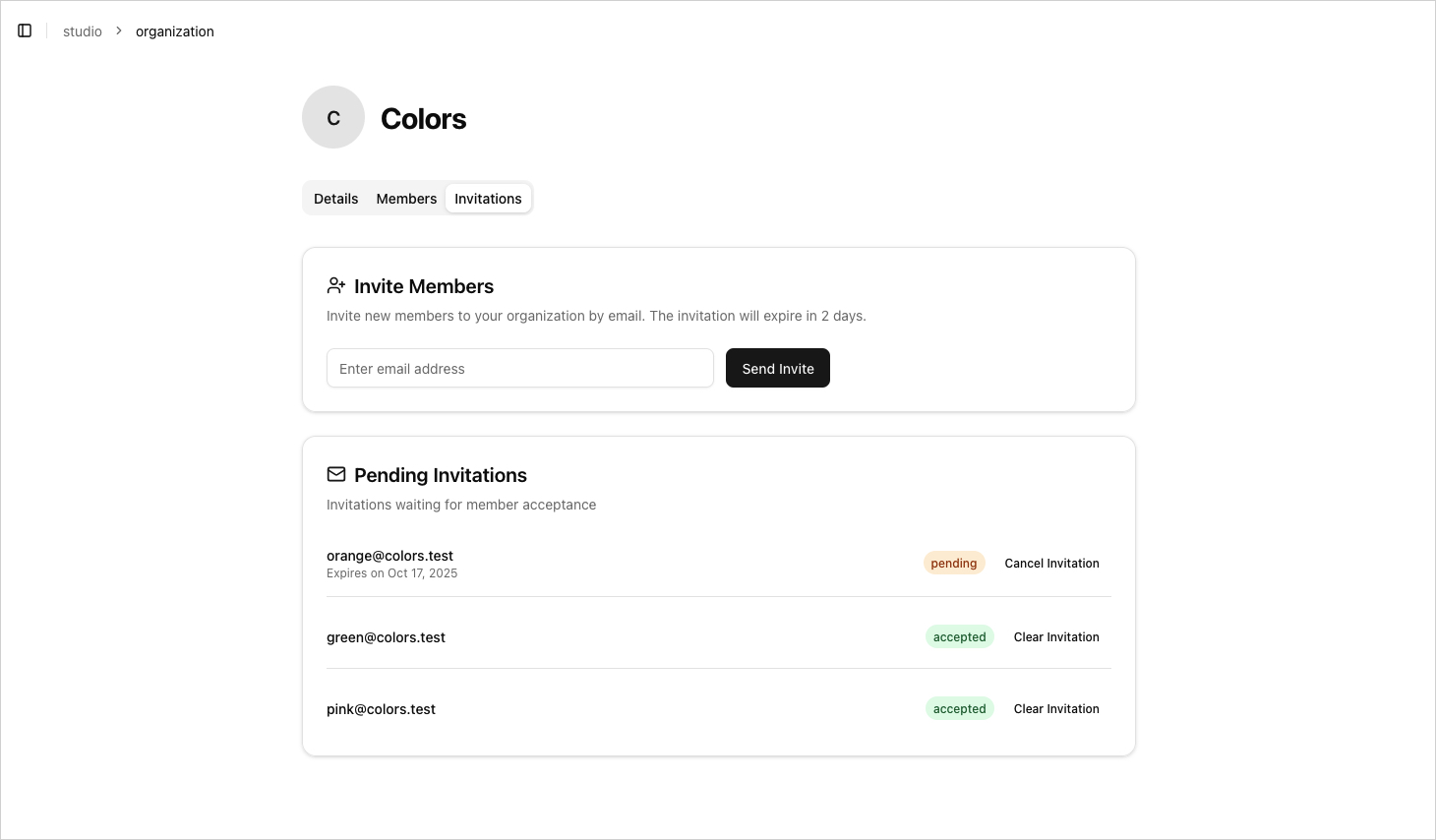
Better Auth provides a built-in system for managing invitations, allowing you to add new members to an organization.
SDK Methods
On both the client (authClient) and the server (auth), the behavior is identical:
// Client side
// ⚠️ Remember to refresh the client state if needed

const { data, error } = await authClient.organization.listInvitations({
  query: {
  organizationId: "organization-id",
  },
});

// On the server, the equivalent method to inviteMember is `createInvitation`
const { data, error } = await authClient.organization.inviteMember({
  email: "example@gmail.com",
  role: "member",
  organizationId: "org-id",
  resend: true,
  teamId: "team-id",
});

const { data, error } = await authClient.organization.acceptInvitation({
  invitationId: "invitation-id",
});

await authClient.organization.rejectInvitation({
  invitationId: "invitation-id",
});

await authClient.organization.cancelInvitation({
  invitationId: "invitation-id",
});
// Server Side
// ⚠️ Don't forget to include headers
// Otherwise, the method will return a 401 "UNAUTHORIZED" status

const data = await auth.api.listInvitations({
  headers: await headers(),
  query: {
      organizationId: "organization-id",
  },
});

await auth.api.createInvitation({
  headers: await headers(),
  body: {
      email: "example@gmail.com",
      role: "member",
      organizationId: "org-id",
      resend: true,
      teamId: "team-id",
  },
});

await auth.api.acceptInvitation({
  headers: await headers(),
  body: {
  invitationId: "invitation-id",
  },
});

await auth.api.rejectInvitation({
  headers: await headers(),
  body: {
  invitationId: "invitation-id",
  },
});

await auth.api.cancelInvitation({
  headers: await headers(),
  body: {
  invitationId: "invitation-id",
  },
});
Callbacks
After creating an invitation using inviteMember (authClient) or createInvitation (auth), Better Auth automatically executes the sendInvitationEmail callback, which can be used to send a custom email containing the invitationId.
There's also an onInvitationAccepted callback triggered when a user accepts an invitation:
import { betterAuth } from 'better-auth'
import { organization } from 'better-auth/plugins'

export const auth = betterAuth({
  plugins: [
    organization({
      async sendInvitationEmail(data) {
        // Handle your custom invitation email sending logic here
      },
      async onInvitationAccepted(data) {
        // Handle post-acceptance logic here
      },
    }),
  ],
})
⚙️ In our case, the invitation email includes a link to a dedicated redirect page /accept-invitation/[invitationId]. This page redirects the user either to the login page (if unauthenticated) or to a dedicated invitation management page, where they can accept or reject the invitation.
Going Further: Teams Mode
Better Auth allows you to add an additional hierarchical level using the teams configuration flag. Each organization can thus have different teams, each with its own members and roles.
This is particularly useful for complex applications where:
- a company includes multiple departments,
- a user has different roles per team,
- you want to refine permissions without multiplying organizations.
import { betterAuth } from 'better-auth'
import { organization } from 'better-auth/plugins'

export const auth = betterAuth({
  plugins: [
    organization({
      teams: { enabled: true },
    }),
  ],
})
Better Auth automatically manages relationships between organization, team, and member. The same Access Control system now applies at the team level, allowing you to restrict actions to a specific team role.
Conclusion
The Organization plugin in Better Auth offers impressive flexibility, allowing you to build a robust and readable access system. The permissions system is fully extensible, letting you define your own entities (project, team, workspace) and as many action types as needed for your business logic.
With Teams mode, you can model advanced hierarchical structures without losing the simplicity of the API.
Better Auth isn't just authentication, it's a modern authorization framework, extensible and delightful to use.